
NASPA International kids school
Located 90 minutes by Shinkansen from Tokyo, Echigo-Yuzawa features NASPA, a ski resort designed for skiers and suitable for families.
It’s a great place for both beginners and experienced skiers, ensuring a safe and enjoyable experience for both adults and children.
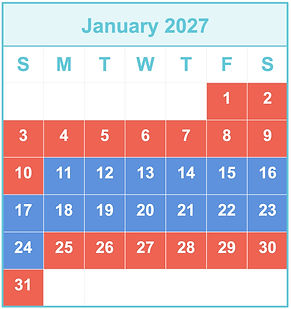
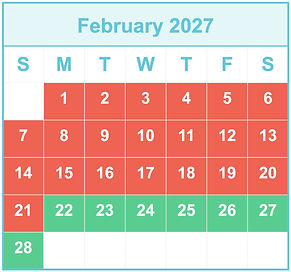
Period
2026/12/19-2027/02/28
Address
949-6101 2117-9 Yuzawa, Yuzawa Town, Minami Uonuma County, Niigata Prefecture
Lesson Prices and Schedule
Private Lessons for children aged 3-6
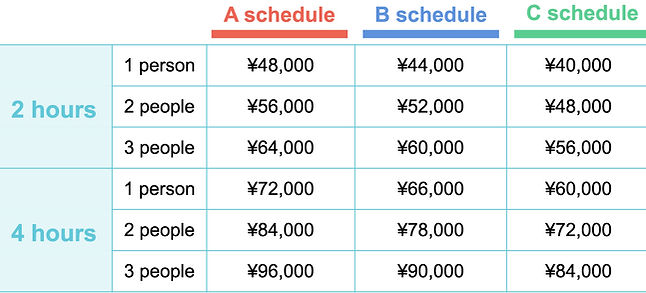
Group Lesson for children aged 3-6

morning
afternoon
10:00 - 12:00
CH/EN
13:30 - 15:30
CH/EN



※Flow for Confirming Reservations
Reservations can be made from the "Lesson Reservation" section on the right side of the homepage.
①Click "Lesson Reservation."
②Review the "Privacy Notice" and close it.
③Select "Category," "Type," and "Product."
④Choose the date, number of participants, lesson start time, level (child's ski level), and quantity (number of participants) and add to the "Shopping Cart."
⑤Review the contents of the shopping cart and click "Next."
*「"Book Now" indicates availability for reservation.
*"Request" indicates no availability and sends a "Request" for a lesson.
➅Log in using one of the following methods:
*"Social Login" via social media.
*"Sign in with Email" for registered email users.
*"Register New Email" for new registrations.
This will guide you through "Register New Email."
⑦After entering customer information (please input the guardian's information), click "Proceed to Checkout."
⑧The screen will switch to the checkout process, where you need to confirm the details.
Enter the information for those participating in the lesson.
*Use "Add Group Members" or "Assign Group Members" to enter the information of those actually taking the lesson.
*If multiple people are attending, enter all their information on this screen.
⑨Review the reservation details and click "Book Now" if everything is correct.
*"Book Now" is available if there are open spots. If not, it will become a "Request."
⑩Confirm the "Online Reservation Terms" and click "Agree" if there are no issues.
⑪The screen will switch to your reservation details, so please review them.
*The same information will be sent to your registered email.
*Payment for the lesson must be completed within one day of the reservation application.
⑫If everything looks good, click "Proceed to Payment" at the bottom right of the screen.
⑬The screen will switch to the payment site, where you will enter your card information and complete the payment.
⑭Once payment is completed, you will receive a confirmation email, and your reservation will be confirmed.
You can check the reservation details through the "Reservation Details" button in the email.
FAQ